

CodeWalkthrough: Bracket Pattern in Python
Safely deal with resources

The bracket pattern is something I first learnt from Cats Effect. It is used in the Resource typeclass so that you can ensure finalizing actions can be performed regardless of what happens. For example, a file needs to be closed after it has been read. The problem is, if an error occurs during the program, the file handle that was acquired may not be closed. The same can happen with database connections. The bracket pattern ensures that finalizer actions such as releasing the file handle will always be performed.
Such an effect can be achieved in Python using the context manager. In fact, many objects in Python already implement this. An example is the file handle that you get when you open a file. This is why you can write with open(‘filename.txt’, ‘r’) as f, and be sure that the file will be closed when you exit the with context.
More importantly, there will be times when you want to ensure certain custom finalizer action that is pertinent to your application is run for a custom resource or object. At that time, the bracket patterns comes in very handy.
In this article, I will go through an example of implementing the bracket pattern using the context manager. The code is here.
A custom resource object
Suppose, you have a custom resource object as follows:
class Resource:
    def __init__(self, with_error = False):

        if with_error:

            raise ResourceAcquisitionError()

        return

    def doSomething(self):

        logging.info("Resource doing something!")
        logging.info("Performing some actions...")

    def doSomethingWithError(self):

        logging.error("Resource doing something that will throw an errors!")

        raise ResourceActionError()

    def release(self):

        logging.info("Releasing resource now.")
Here the resource object is a little contrived for demo purposes. During its initiation, if with_error is True, then an exception is raised to simulate a failure in acquiring the resource, such as FileNotFoundException.
There are then two methods: doSomething and doSomethingWithError, to simulate interacting with the resource and in the case of the latter, something goes wrong.
Lastly, there is a method to release the resource.
The bracket pattern code
The implementation of the bracket pattern uses the yield keyword. As such, control of the main program is passed from one function to another. To make it easier to follow, I’ll break the code down into parts.
First is the main program interacting with the resource shown below.
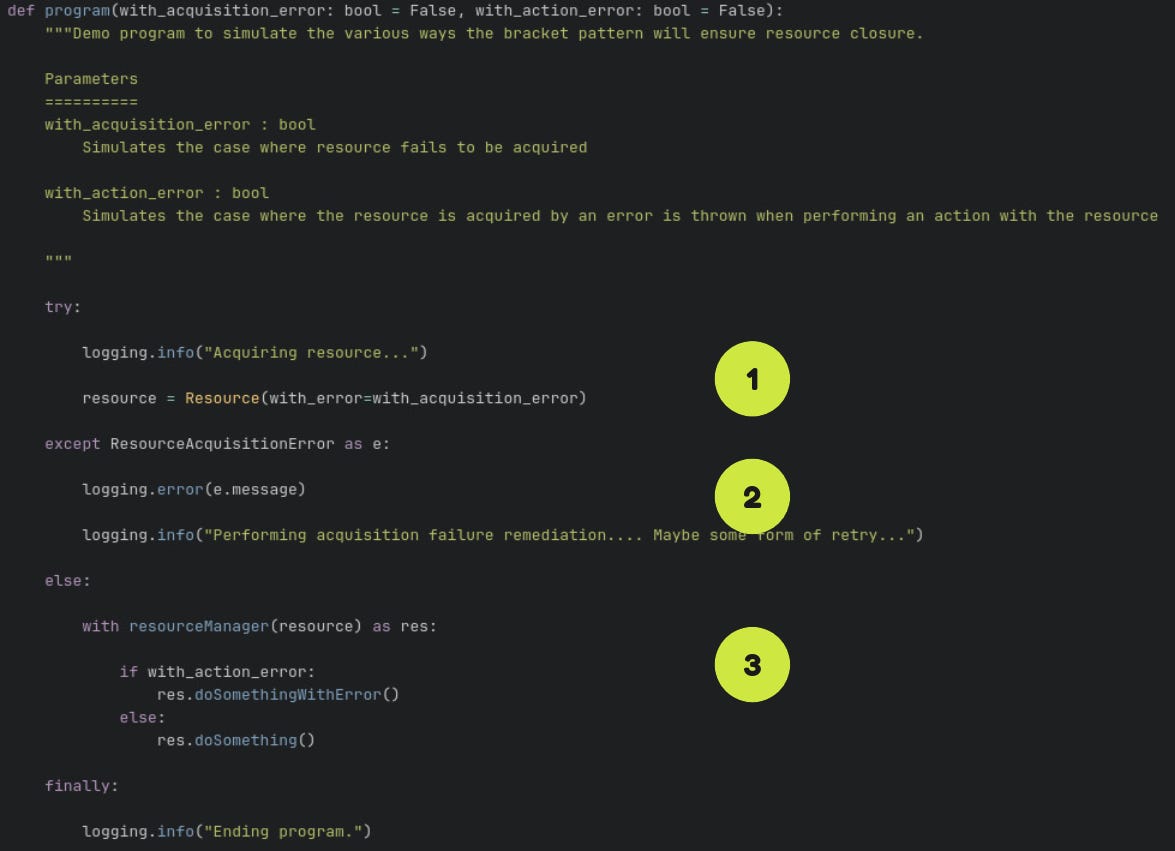
There are three main parts labelled “1” for the acquisition of the resource, “2” for actions to perform when the acquisition fails and “3” for actually using the resource.
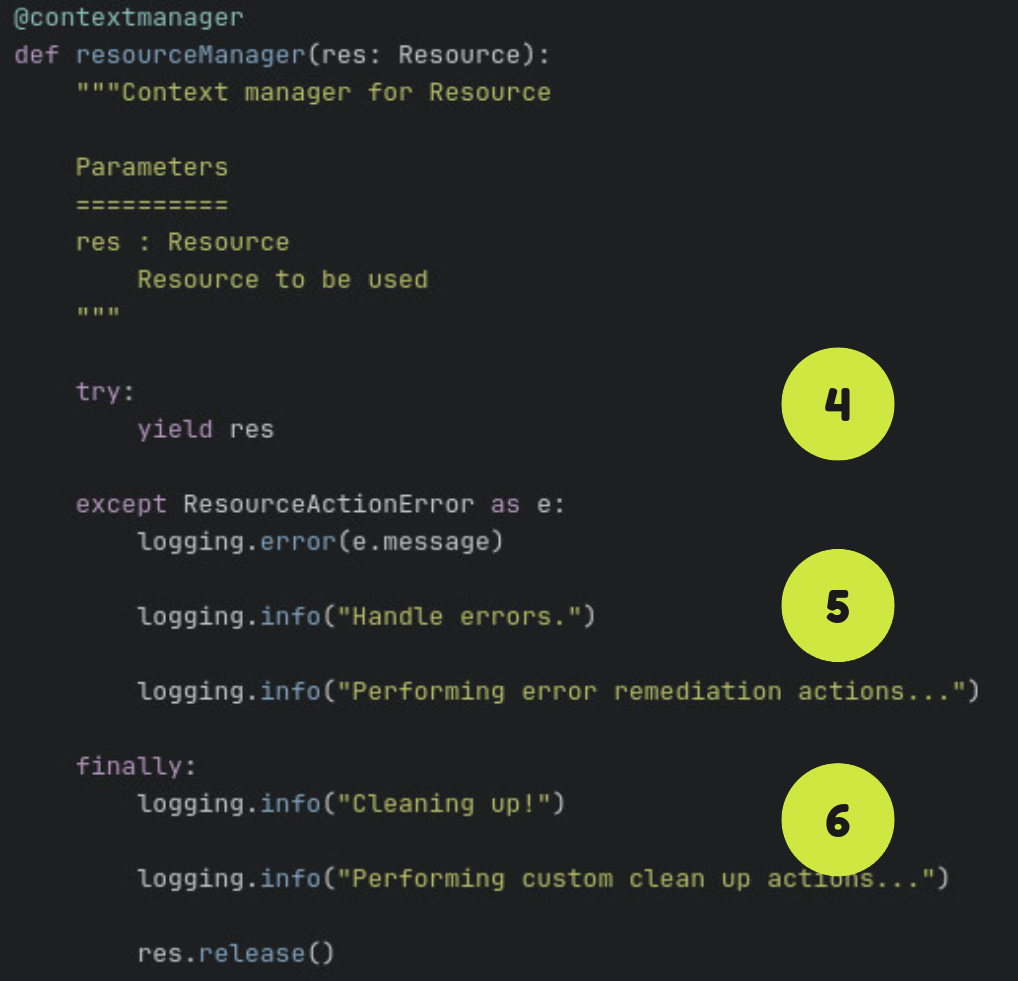
Next is the resource manager which is decorated with the context manager from contextlib. This implements the bracket pattern. There are again 3 main parts labelled “4” to return the resource, “5” to handle any errors that arise from the use of the resource and “6” for performing the finalizing actions when everything is done.
Demonstrating the bracket pattern
The main code in the repo demonstrates the use of the bracket pattern three scenarios: the “happy path”, the case where something goes wrong when interacting with the resource and failure in resource acquistion.
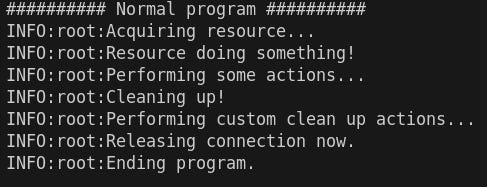
In the “happy path” where everything goes smoothly. The resource gets acquired in “1”. Then using the resource manager the resource is yielded in “4”. This yields control from the resourceManager back to program. Then we interact with the resource in “3” before we exit the resourceManager context which then performs the finalizer actions in “6”.
So “1” → “4” → “3” → “6”.
The output is seen below.
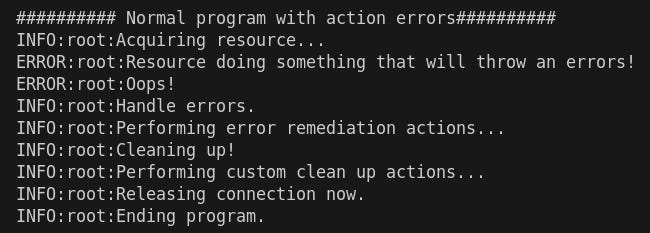
In the case where something goes wrong while interacting with the resource, we again acquire the resource in “1”, enter the resourceManager which yields the resource in “4” but this time, an exception is raised in “3”. At this point, control goes back to the resourceManager and the error is handled in “5”. This is where you as the developer can perform custom actions like logging detailed information of the error. And as usual, we arrive at the finalizer actions in “6”.
The process is “1” → “4” → “3” → “5” → “6”.
The output is shown below.
Lastly, in the case where the resource fails to be acquired at all, we go from “1” to “2” (where we can implement other behaviours like retries or logging) and finally ending the program.

Conclusion
I hope that in this short post, you can see how with the use of try… except and context managers, we can ensure that resources and the exceptions raised in interacting with them can be safely handled.
This safety may not seem much in prototypes but will definitely be worth more than its weight in gold in production systems.