

CodeWalkthrough: Sudoku in Scala
Coding my own Sudoku Generator and Solver

I love playing Sudoku. I must have played at least 1000 games over the years. Hence, it’s quite a wonder how I’ve thought of coding my own Sudoku generator and solver only recently. More than that, it is only when I started to think about how to code my own Sudoku that I realized that the game that I’ve almost taken for granted and have used to simply pass time, is much more complicated that it seems.
So, here’s my attempt at coding my own Sudoku generator and solver.
The code repository is here. As usual, I recommend that the reader download the code and follow along. Links to the exact lines of code will be provided in the post.
Nomenclature
A Sudoku game is a 9x9 grid. Each grid is a 3x3 grid of blocks, which are themselves 3x3 grids of cells. Each cell can be empty or filled with the numbers “1” to “9”. In the code you will see later, a cell with a value of “0” means it is empty. The aim of the game is to fill the entire grid with the numbers “1” to “9” while ensuring that the numbers do not repeat in each row, column and block simultaneously.
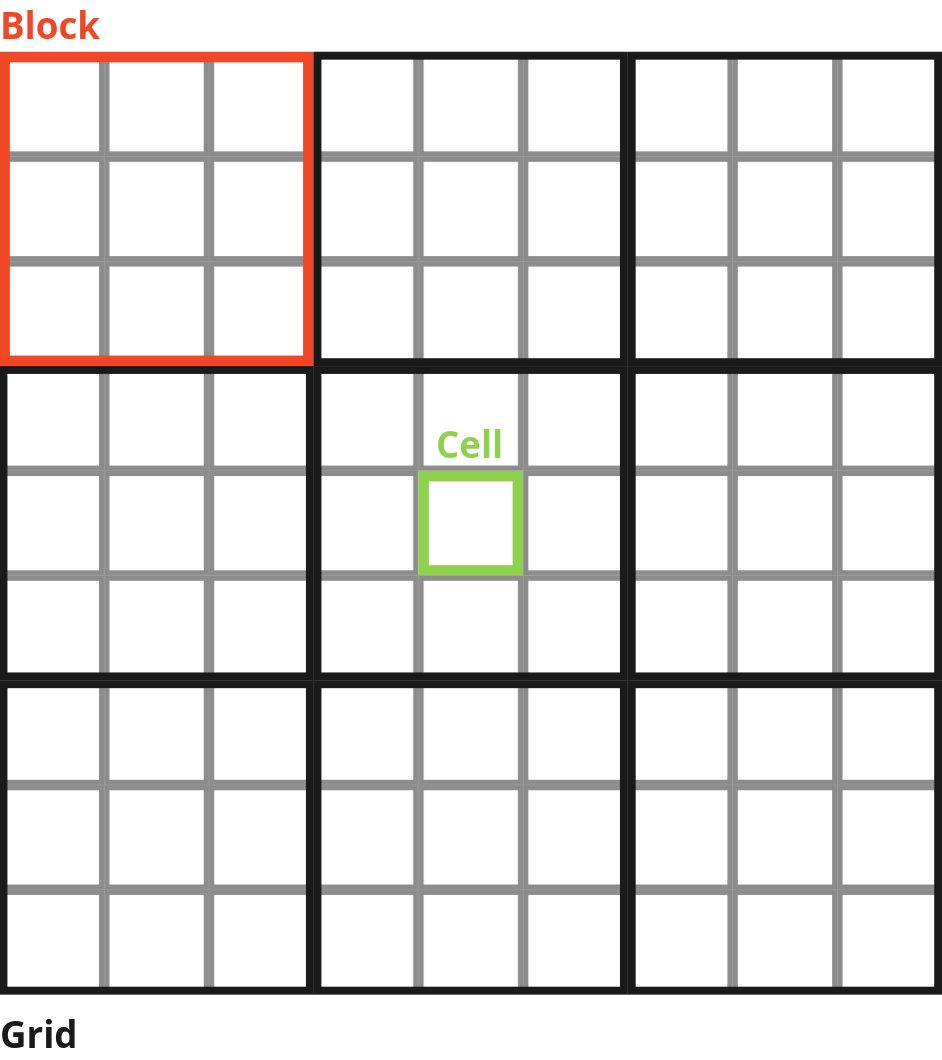
A Sudoku grid with empty cells waiting to be filled in is a Sudoku puzzle. The pre-filled numbers in a Sudoku puzzle are called clues.
Some design choices in the code
Let me first highlight some design choices I made so that it might be easier to understand why I coded the Sudoku solver and generator the way I did. The first design choice I made was to use Vector as the data structure to store the Sudoku grid. In Scala, Vector is an immutable data structure. This means that you can’t change it, you can only make a copy of it with an updated/new element. This is because, as you will see later, I will be storing the grid at different stages of the solution. Using an immutable data structure, gives me the piece of mind that I won’t have any weird behaviours that affect earlier states while editing later states.
Secondly, I approached the problem with Functional Programming. As a result, you will see that I will often return a new instance of an object after some action taken, instead of returning a modified object. This is also related to the immutability of Scala vectors where each update results in a new copy.
Grid Trajectories
Another thing that you will see in the code is what I call grid trajectories. (This is my own definition, not a conventionally known term.) Basically, the act of playing Sudoku is to move the grid from one state to another via the action of filling up a cell.
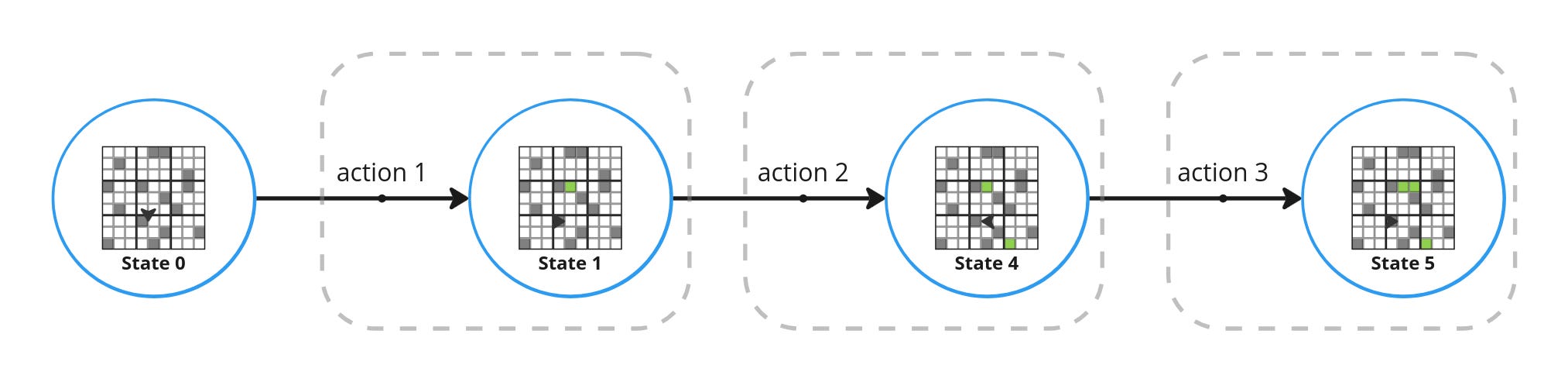
A grid trajectory is the history of all the states that the Sudoku grid has been through together with the actions that resulted in that state. The definition in code is here, as well as below. A CellAction, contains the row and the column of the cell being edited as well as the number that was used to fill the cell.
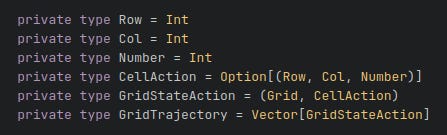
This will become useful to implement memoization in the backtracking algorithm which I will describe presently.
Backtracking Algorithm
The backtracking algorithm is a well known algorithm that is used when exploring a solution space where there are many valid solutions in a systematic way. Basically, you keep trying taking actions that are valid, transitioning the Sudoku grid from one state to another. If you reach an invalid state, you undo your previous action, revert the Sudoku grid into its previous state and select from the remaining valid actions from the previous state. You keep doing this until at least one solution is found.
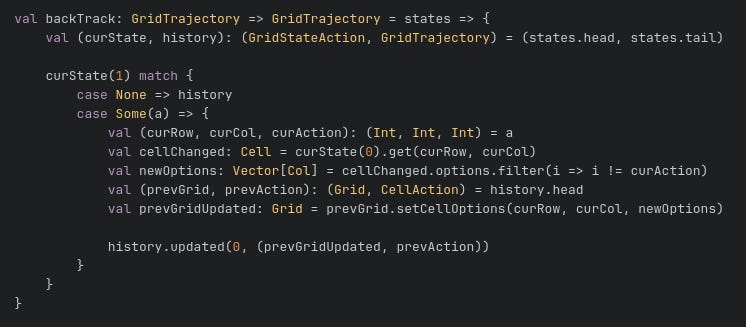
To do this in code, usually you would use a recursive function that tracks the history of the states. An example can be seen in my implementation of the solver function. Note that the main recursive function takes a GridTrajectory that enables us to revert to previous states. See also the backTrack function that takes in a GridTrajectory and returns a GridTrajectory.
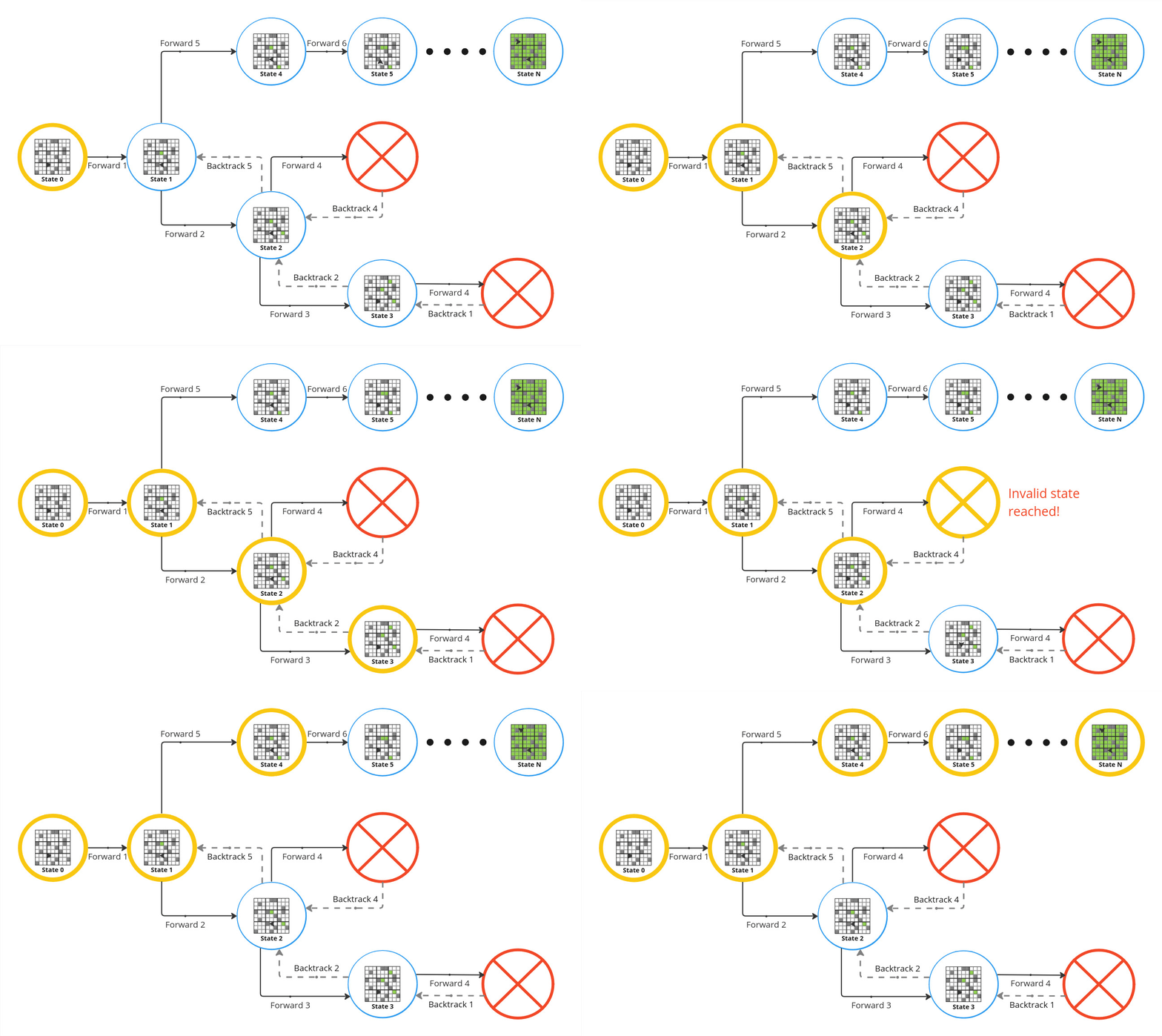
Taking a closer look at how the backtracking algorithm progresses below, we start from “State 2” and say we select a cell action that progresses to “State 3”. After “State 3”, let’s say there is only one state left to which we can go. However, that state is an invalid state. In Sudoku, an invalid state is one in which there is at least one cell where there are no valid options. As a result, we can only move back to “State 3” (see “Backtrack 1”).
Since there are no more further states from “State 3”, we can only backtrack further to “State 2” (see “Backtrack 2”). The only state left from “State 2” is also invalid, which means we end up in “State 2” again. Having no more options, we again backtrack, this time to “State 1” (see “Backtrack 5”).
We repeat this process until we are able to find a solution or we exhaust all possible actions.
Sudoku Data Objects
There are two main data objects in the code that will enable the interactions with the Sudoku grid.
Cell
The first data object is the Cell. It contains information about the row and column of the cell (0-indexed), the number it contains as well as the options that are available.

The available options are derived based on the constraints that for the number “1” to “9” there should no number occurring more than once in each row, column and block. This is found using the isValidCellValue function.
def isValidCellValue(row: Int, col: Int)(trialValue: Int): Boolean = {

            (getRow(row).filter(c => c.col != col).forall(c => c.number != trialValue)) &&
                (getCol(col).filter(c => c.row != row).forall(c => c.number != trialValue)) &&
                (getBlock(row, col).filter(c => (c.row != row) && (c.col != col)).forall(c => c.number != trialValue))

        }
Grid
The grid data object contains all the methods used to interact with the Sudoku grid, such as getting/setting cells or checking whether a number is valid for a cell.
Solver
The Solver implements the backtracking algorithm using a recursive function. The main logic is here and shown below as well. As described before, if there are cells with no options (i.e. an invalid state) the Sudoku grid will be backtracked to the previous state otherwise, a new number is added to one of the empty cells.
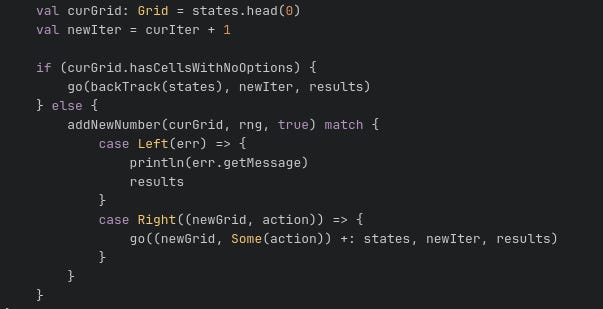
A note on the backtracking logic. The first state in GridTrajectory is the starting state of the Sudoku puzzle and the corresponding cell action is None. If so, an empty GridTrajectory is returned. Importantly, if there is a state to backtrack to, then not only is the number of the cell that is previously changed reverted back to zero, the number that was set is also removed from the options. For example, if setting a cell to the number “3” leads to an invalid state, then backtracking means that that cell is set back to “0” and importantly “3” is removed from the options available to the cell.
This is ensure that the option that leads to an invalid state will not be selected later.
Lastly, the solver has 3 solver modes.
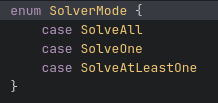
SolveOne is the mode that seeks to find the first solution available. SolveAtLeastOne is the mode that will continue to find more solution until more than one solution is found or the maximum iterations allowed is reached. This useful as can be seen later in the Generator section for testing whether there is a unique solution to a particular Sudoku puzzle. SolveAll as the name suggests will keep looking for as many solutions as maxiumum iterations will allow or when all possible moves are exhausted. The return logic for each of these states are shown here.
Generator
Generating a full grid
To create a Sudoku puzzle, we first start with a full grid where all the numbers are filled. This is generated using the createFullGrid function here. It fills the cells one by one in sequential order (instead of randomly selecting a cell each time). The backtracking algorithm is also used here to allow the generation to continue should an invalid state is reached.
The cells are filled in sequentially in row-major order because it allows the cell to be filled to take advantage of the information from numbers in the same row/column/block. If a random cell is selected each time, then the selected cell might be one where there are no other filled cells in the same row/column/block and no information to inform the choice of number to fill.
Generating a Sudoku puzzle
An important thing about a Sudoku puzzle is that it should have a unique solution. However this is not guaranteed if you simply remove a bunch cells from a full grid at random.
To ensure that the puzzle has a unique solution, the createPuzzle function removes cells one-by-one. With each removal, the solver is used to solve the puzzle in SolveAtLeastOne mode. This ensures that the puzzle still has a unique solution with the removal of that cell (at least up to the maximum iterations limit). You keep repeating this remove-and-solve step until you reach the minimum number of clues desired (see the minClues parameter) or if there is no other way to remove more cells.
Note that it is not guaranteed that the final puzzle generated will only have minClues clues. Also it is not always that the generation will succeed there is a certain level of randomness involved as the way the cells are removed may not result in a uniquely solvable puzzle. For example, although I had set minClues to 17, the final puzzle that resulted was one with 25 clues.
Results
The results of a sample generation of the Sudoku puzzle and its solution is shown below.
Solving puzzle with 25 clues...
Correct answer found.
Puzzle
============
000 | 305 | 700
000 | 000 | 058
080 | 060 | 003
---------------
060 | 053 | 000
500 | 410 | 000
004 | 800 | 000
---------------
100 | 000 | 279
006 | 000 | 100
800 | 009 | 006
---------------
Solution
============
491 | 385 | 762
637 | 921 | 458
285 | 764 | 913
---------------
769 | 253 | 841
528 | 416 | 397
314 | 897 | 625
---------------
153 | 648 | 279
976 | 532 | 184
842 | 179 | 536
---------------
Conclusion
It was fun learning about and implementing the backtracking algorithm as well as satisfying to finally peek behind the scenes of the game I’ve played so often. I also enjoyed being able to practice Functional Programming.