

Make working with git worktrees easier using direnv and sops
Stop copy-and-pasting env vars or setting static paths to secret files

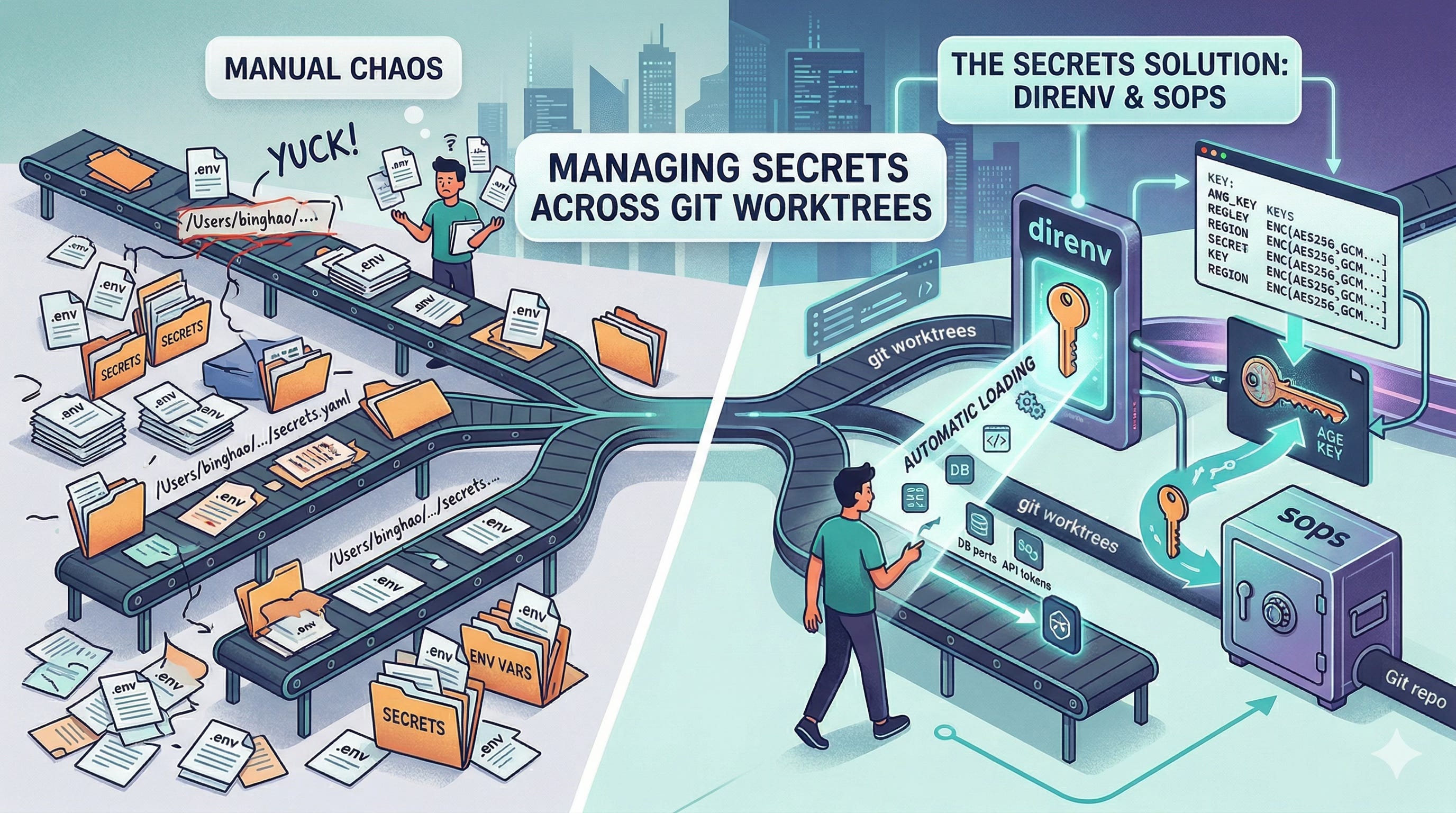
I love working with Claude using git worktrees. They allow me to work on multiple features concurrently on the same code base. In fact, worktrees are the recommended way of working on multiple things in parallel with code. But I quickly run into problems with persisting environment variables and allowing my code to find secrets, both of which I do not commit to git. My default response would have been to copy-and-paste the .env files into the worktree and to hard code a path to some secrets file stored separately (to wit you will start seeing ugly things like Users/binghao/…/secrets.yaml in the codebase. Yuck!). If I were feeling a bit fancier, I’d probably run a secrets vault or use a secrets manager on AWS for my secrets. But that’s just additional infrastructure I would have to run and can be a hassle for small hobby projects.
This is where Claude led me to direnv and sops which help me overcome both problems, respectively. In this post, I will talk about what the above two things are, how I use them and what are some of the gotchas.
direnv
What it is
direnv is a tool that allows me to automatically load environment variables whenever I enter a directory. It also unloads the environment variables when I leave the directory so that I don’t get stuck with stray environment variables when I go and do other stuff within the same shell.
How I use it
Once direnv is installed, everything starts with a .envrc file in your repository root. In my case, I only have a very simple directive within the .envrc file, which is as follows,
dotenv_if_exists <dir_of_dotenv_file>/.envThis states that whenever I enter the directory, if the dotenv file exists at the stated path, load it.
Then of course, I will have my dotenv files with my environment variables such as database ports, etc. listed in there.
Now each time I enter my git worktree, the environment variables will be automatically loaded.
Gotchas
When you first enter a newly created worktree,
direnvwon’t be able to load the environment variables until you typedirenv allowto explicitly allow the loading of the.envfile.In a deployment situation, you would still need to enable your CI/CD framework to find the environment variables and set it on deploy. The
direnvdocumentation gives an example of how it can be done with GitHub Actions.
Other thoughts
I really like the fact that the environment variables are loaded and unloaded automatically without me having to manually source certain files or add in code to load the
.envfile. It saves me the time and frustration needed to ensure that the environment variables are properly loaded with each new worktree.direnvincludes many other directives that can enable much richer behaviour than what I’ve explained here.
sops
What it is
sops (aka Secrets OPerationS) is tool that is used to edit encrypted files (JSON, YAML, ENV, etc.). It supports encryption with “AWS KMS, GCP KMS, Azure Key Vault, HuaweiCloud KMS, age, and PGP”.
How I use it
Basically, sops allows me to store my secrets file in the git repo in a way such that the secret names are visible but the secrets themselves are encrypted. In this way, I can have quick reference of the secret key names while I’m working on the code but at the same time have the secret safe enough to commit to git. An example of the secrets YAML file that is encrypted by sops is shown below.
aws:
    bearer_token_bedrock: ENC[AES256_GCM,data:gIibPeeTGYY4npuXKl7Ogjz9+r//mNzu5u0GvAZm9bghFgn24+XTqud3wyz+76OB2NRgkYRm3BruMDFdC4tTwTWeiCg0zQ5k5Tl+4ZG+/rZsoqs1Xr110F7ZQ10STq0LxxIrRpQSKqgaOZURiDJKXNBXwyzqJNdSzu8WRDis3wyqDDw6,iv:lycm17nnQAQDCmv2ePV7sF6oF/Tg0y9GMUjhNJWrMDs=,tag:C7oHCfV+DxfhcCsUnZ1YpA==,type:str]
    region: ENC[AES256_GCM,data:PDulQJpkP3Ir9nw3aA0=,iv:PMiFy9KGAU0ofW7ilF20iRD1zHS8baUZU1ki81rvOY0=,tag:opBsmKCbKfB8lVhl8RykCQ==,type:str]
    bedrock_model_id: ENC[AES256_GCM,data:u8dnWmGXO2yrWzYALTJx5a4Cq/WqUX3ALD6sEcZ2DDa2CZQOUeRIfWpLrUxr4uU=,iv:M9uJJTxooRo7lAuhmpPkp5of6QzuiNC3n0i3kfVRH4I=,tag:qRt/d1HLgoXMjGIMApm8bw==,type:str]
As can be seen, I can still see how to reach the secrets as the variable names are still visible to me but the values are now encoded gibberish.
In my case, I use age to encrypt my secrets as it is a local development project. I start by creating a key file in the same location as my .env file, say ~/.config/projectyXYZ/age-key.txt, by issuing the following command. This step also outputs a public key which needs to be noted down.
age-keygen -o ~/.config/projectyXYZ/age-key.txt
chmod 600 ~/.config/projectyXYZ/age-key.txt
Then I set the environment variable SOPS_AGE_KEY_FILE in my .env file which gets loaded by direnv each time I enter the repository. This tells sops to use this key file to decrypt my secrets file.
SOPS_AGE_KEY_FILE=~/.config/projectXYZ/age-key.txtIn my repo root, I have another .sops.yaml file that looks like this.
creation_rules:
  - path_regex: secrets/.*\.enc\.yaml$
    age: <public key from key creation step>
This tells sops that any file with the path name according to the regex pattern should be decrypted with the age key using the SOPS_AGE_KEY_FILE and the public key.
To edit your secret values, you can’t just open the file and type. As mentioned, the values are encrypted. You need to use sops <path_to_secrets_file>.yaml, which will use sops to decrypt the file and open in the default editor. Once you save and exit, the values will be decrypted again.
To simply see the secrets, type sops -d <path_to_secrets_file>.yaml.
I also have a script (courtesy of Claude), called with-secrets, that would take the secrets file, decrypt it, reformat the key names (replace “.” with “_” and all uppercase) and exports the keys and values as environment variables, shown below.
#!/usr/bin/env bash
#
# Decrypt SOPS-encrypted secret files and exec a command with the
# decrypted values exported as environment variables.
#
# Usage: scripts/with-secrets <secret-file> [<secret-file>...] -- <command> [args...]
#
# Each YAML file is decrypted via `sops -d` (never touches disk) and
# flattened: nested keys become UPPER_SNAKE_CASE env vars.
#   aws.access_key_id  ->  AWS_ACCESS_KEY_ID
#   aws.region         ->  AWS_REGION
#
# Requirements: sops, yq, age key configured via SOPS_AGE_KEY_FILE

set -euo pipefail

die() { echo "error: $*" >&2; exit 1; }

# --- Preflight checks -------------------------------------------------------

command -v sops >/dev/null 2>&1 || die "sops is not installed (brew install sops)"
command -v yq   >/dev/null 2>&1 || die "yq is not installed (brew install yq)"

if [[ -z "${SOPS_AGE_KEY_FILE:-}" ]]; then
  die "SOPS_AGE_KEY_FILE is not set. Add it to your env vars."
fi

if [[ ! -f "$SOPS_AGE_KEY_FILE" ]]; then
  die "Age key file not found: $SOPS_AGE_KEY_FILE"
fi

# --- Parse arguments ---------------------------------------------------------

secret_files=()
while [[ $# -gt 0 ]]; do
  case "$1" in
    --)
      shift
      break
      ;;
    *)
      [[ -f "$1" ]] || die "Secret file not found: $1"
      secret_files+=("$1")
      shift
      ;;
  esac
done

[[ ${#secret_files[@]} -gt 0 ]] || die "No secret files specified"
[[ $# -gt 0 ]]                  || die "No command specified after --"

# --- Decrypt and export ------------------------------------------------------

for secret_file in "${secret_files[@]}"; do
  # Decrypt to stdout, flatten nested YAML to KEY=value lines.
  # yq outputs "section.key = value"; we convert dots to underscores
  # and uppercase everything.
  while IFS='=' read -r key value; do
    # Skip empty lines
    [[ -z "$key" ]] && continue
    # Trim whitespace
    key="$(echo "$key" | xargs)"
    value="$(echo "$value" | xargs)"
    # Convert dots to underscores, uppercase
    env_name="${key//./_}"
    env_name="${env_name^^}"
    export "$env_name=$value"
  done < <(sops -d "$secret_file" | yq -r 'to_entries | .[] | .key as $section | .value | to_entries[] | "\($section).\(.key)=\(.value)"')
done

# --- Exec the command (replaces this shell process) --------------------------

exec "$@"
I use it as such, with-secrets secrets/secrets_file.yaml -- scripts/app_you_want_to_run. The front half decrypts the secrets and exports the environment variables and the second part is taken as an argument and run in the last line of with-secrets.
Gotchas
In my case, the age key file is the key to the secrets, if I lose it, then the secrets cannot be recovered. Although, if I do lose the key file, I should probably reinstantiate all the secrets anyway.
You can use external key management systems like AWS KMS, but that will be an external infrastructure you have to manage. And if you are indeed using something like AWS KMS, you might as well use it directly. For a local project though,
sopsworks well.There is no automatic rotation for the secrets values (as what AWS KMS does for you) as the secrets resides within a file, except that outsiders cannot view it.
Other thoughts
I really like the fact that I can see the structure of the key file while coding without worrying that the secrets will be leaked. For example, I can know that my AWS Bedrock token can be reached at
secrets[“aws”][“bearer_token_bedrock”]by looking at the encoded secrets file.I think it works will for a small-medium sized individual project as it provides the right level of security with minimal setup and infrastructure.
Both tools are of course much more flexible and powerful than what I give them credit for in this post. I hope you found this post useful and are encouraged to dive deeper on how direnv and sops can be integrated into your workflows to make your life easier.
Please feel free to post your comments/thoughts or any questions in the comments section of this blog post.