

I surrendered coding to AI. Here's the workflow I ended up with.

Around 6 months ago I decided to build my own version of a desktop AI assistant (kinda somewhere between Claude Code and OpenClaw) for a number of reasons that I won’t go into right now. The important thing here is that, for this project, I chose to surrender the act of coding to AI. The reason for that is that, though I do enjoy coding, I wanted to find out for myself what AI coding can do and what it really means for software development (and all that it entails in a tech-enabled world) and this is the perfect project to do it.
That being said, I was adamant not to lose control over the design of the project, as I was cognisant of how easily one can become led by the nose by AI and simply become an approver of reactive Claude suggestions from my earlier experiments with AI coding. So I proceeded slowly. Task by task. Feature by feature. At each step, paying attention to the design of the application that I have in my head and ensuring that the AI agent always knows the ontology of my design. In fact, my discussions with Claude have at times bordered on pedantic.
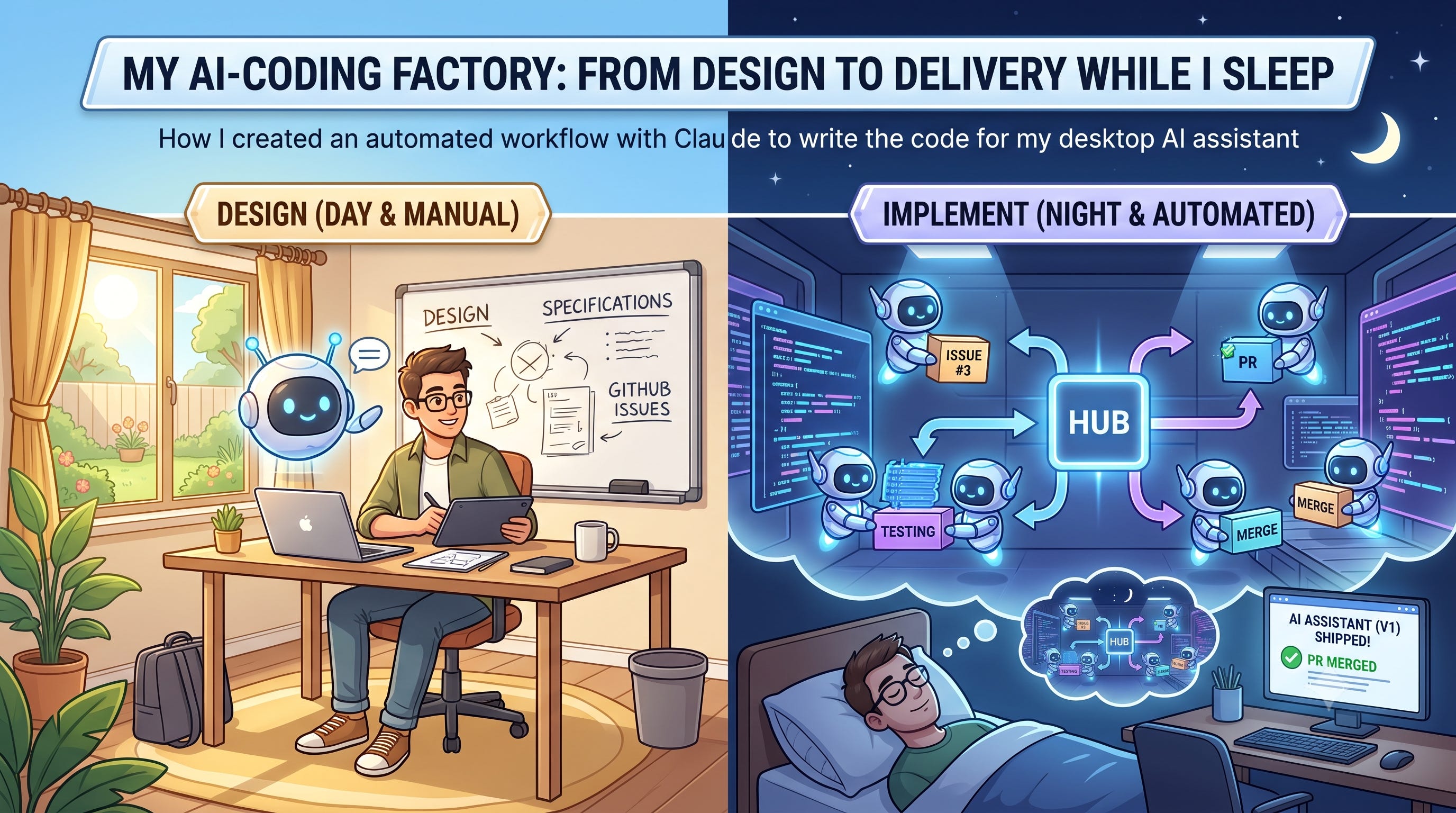
Over time, I found myself repeating certain work patterns of discussing, implementing and reviewing. So I formalised some of it into a more structured process and automated some of it. I ended up with a workflow where I discuss with Claude in detail each development milestone and have Claude deliver autonomously while I sleep. Pretty close in my mind, for a one-person hobby project, to AI-coding factories where the humans decide the specs in the day and AI delivers at night (see here and here).
In this post, I describe the workflow that emerged and my reflections on it. The Claude skills and dynamic workflows are in this repo to make it easier to follow along. For those who want to dive into how the workflow works in detail and how to apply it, see this GitHub page. I hope this will be useful in helping you think about your own AI coding workflows.
Overview
Every project is broken down into a series of MVPs which are delivered in three phases: Design, Implement and Ship. GitHub issues are used as the work tracking and context provision tool for Claude. The Design phase is where the MVP is specc-ed in detail and broken down. The Implement phase uses a Claude dynamic workflow to continuously deliver the GitHub issues related to each MVP. The Ship phase is a human gate where I perform UATs, fix bugs, review and merge the PR.
Note on new projects
I will spend a lot of time sketching out the world in which the application will live in, which includes providing specific definitions of key concepts like nodes or message. Once this is done, Claude will have enough context to ship the MVPs using the process you will now read about.
See also this post on how I initialise new projects with the /think mode and Claude.
Design
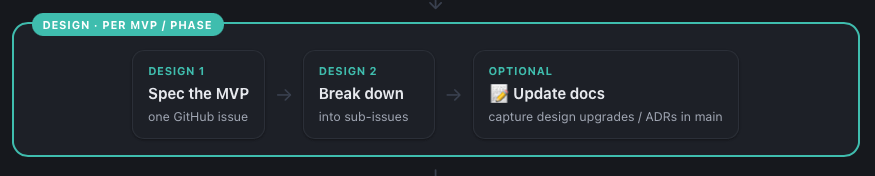
For this phase, I will use the /think skill to help me sculpt out what I have in my head (see here). It will start of with a chat with Claude. No code change. When I’m sort of happy or when I need a break, I will ask Claude to create a GitHub specs issues (i.e. an issue labeled with the “Specs” label). I can either continue later or if I’m already happy I move on to the next step.
I will then use the spec-breakdown agent to breakdown the MVP specs issue into sub-issues. These GitHub sub-issues will not only be tagged to the MVP specs issue, they will also have the dependencies between them specified using the GitHub blocking/blocked-by functionality. Each of the sub-issue is a small piece of work that can be delivered by Claude in a reasonable amount of time.
All of these happen in the main branch as there are no code changes. Only design and speccing. Occasionally, the MVP requires a fundamental change/upgrade in design or taxonomy. For example, a change in infrastructure selection. In this case, I will also update the docs (in the main branch) with the update concepts or Architecture Decision Records (ADRs). See here for how I organise my documentation. The reason for this is so that when Claude starts working, it can have all the latest context in the documentation.
The Design phase is a rather “manual” phase where it’s mostly a conversation between Claude and I.
Implement
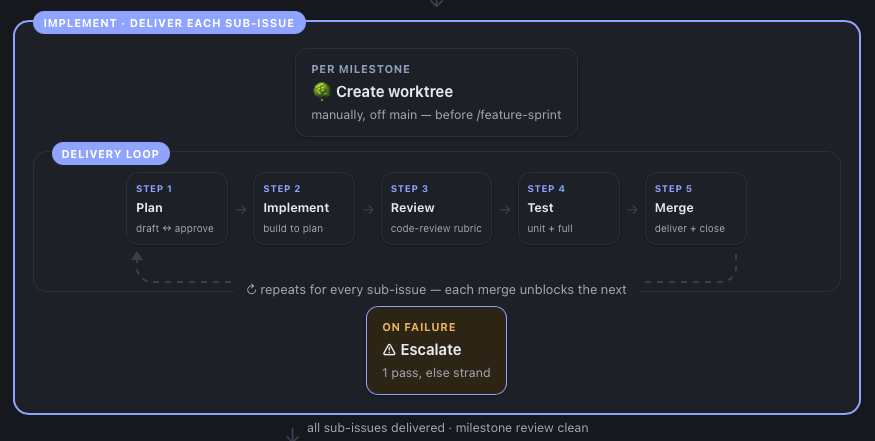
I first manually create a git worktree. This isolates the work that is going to be done from the main branch totally. It’s also a reminder that the implementation phase has started.
Then I use the /feature-sprint workflow to iteratively deliver the sub-issues. What it does is that it will read the GitHub sub-issues tagged to the MVP spec issue given to it, and it will take the all the sub-issues that are not blocked and implement them in parallel in their own git worktrees. I.e. each sub-issue is implemented in a worktree that is separate from the MVP worktree.
So depending on how many issues are unblocked, you could have 2-3 issues being implemented concurrently.
Each sub-issue implementation follows the standard plan-implement-review-test-merge loop executed by a sub-agent. Every plan made by a planner agent is reviewed by a separate architect agent.
The review stage looks out for any HIGH or MEDIUM bugs/problems and fixes them before merging back to the MVP branch. The reason only HIGH/MEDIUM bugs are fixed is because there is another full review at the end. This is just to make sure that the code is relatively OK at the end of each sub-issue.
The merging of the code is sequential. That means that if two sub-issues are completed and need to be merged, it will be merged one after the other. This is to maintain a linear code lineage and prevent one sub-agent from overriding the code of another. Any conflicts are fixed and resolved before merging.
After each merge, the related sub-issue is closed on GitHub, unblocking the other sub-issues.
The workflow proceeds asynchronously. What I mean is that, say at the start there are 2 sub-issues that are unblocked and are worked on. The workflow does not wait for both issues to be merged before looking for the next one. Once a sub-issue is completed and closed, the workflow immediately looks for the next issue to work on. This is so that independent sub-trees in the issue dependency graph can proceed unimpeded each other.
There is a max retry limit for the plan/architect review as well as the merge/fix phases. If the retry limit is exceeded, the task is escalated to a high effort Opus agent to fix. And if even that fails, the task is stranded to be manually fixed, after all the possible sub-issues are delivered, by either myself or the main agent that triggered the workflow. In practice, I almost never have to fix anything by myself. The escalation usually works.
Once all issues are completed, one last review of the whole implementation is done. This is to surface any problems/inconsistencies. that might not be visible at the sub-issue level but present when you look at the whole diff. The workflow then proceeds to fix all issues found.
Ship
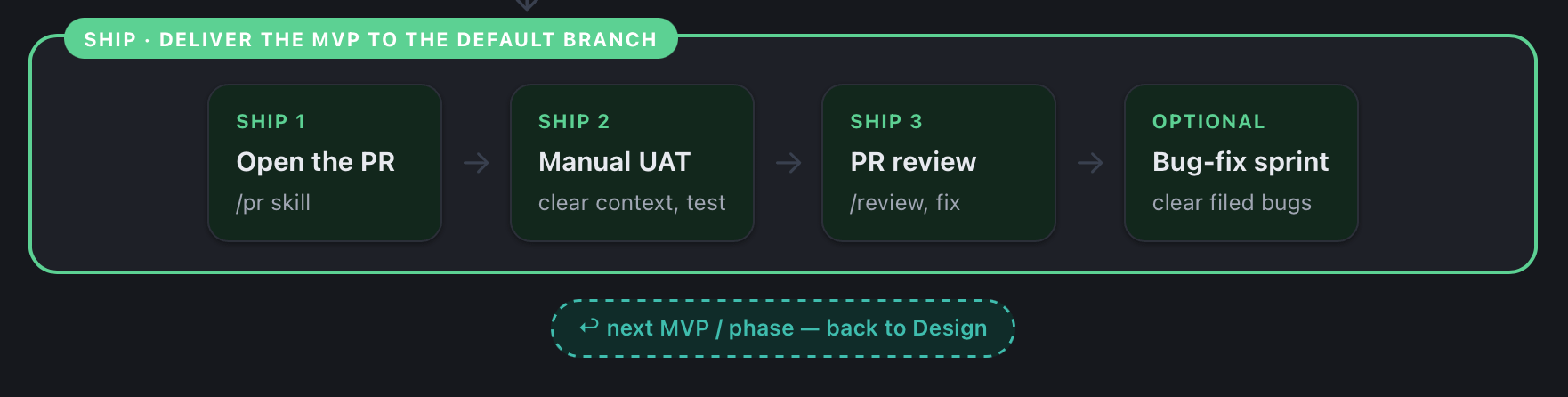
So the implement phase is the key automation step here. It allows me to design in the day and sleep while agents deliver the specs that have been laid out. Once they are done, the Ship phase is the human gate that merges everything back to main.
I first open a PR manually. I then do a manual UAT (start the app, go through the features, etc.). If all is OK, I also do a PR review (/review in Claude Code). I can then choose to file the issues as bugs in GitHub or if I have time, just fix them on the spot with Claude Code.
If the issues are filed as bugs, then I also have a bug-fix Claude Code dynamic workflow to fix the bugs one by one.
Once all is well and good, I merge the PR and move on to the next MVP.
Thoughts
I didn’t set out to create workflows like this. It just happened. It’s only later that I found out about all the hoohah on “loop engineering”. I must say, I was kind of surprised that I ended up creating this workflow. After all, I started out simply using Claude to deliver feature by feature and manually decided the order of the changes to make.
I was also pleasantly surprised by the rate of progress of my project with the help of this workflow. With this, I spend more time discussing and designing, leaving the execution of coding to Claude entirely (while I sleep). In fact, sometimes I start the workflow just before I leave for work, turn on remote control on my laptop and just periodically ask for the work status during the day via my Claude mobile app.
Claude, with its coding abilities, and the proper review loops usually deliver as required. The manual fixes I have to do after are usually minor things that I failed to discuss during the design phase or some UI adjustments (because I’m too lazy to do UI wireframes).
Frankly speaking, if you asked me whether I miss coding now, I’d say not much. At least not for this project. Readers of thoughtsre would know that I like to code by hand. But this experience has clarified to me what I enjoy coding by hand. I don’t mind the coding of software applications to be taken away from me. Because building software applications is not really gets my brain going. The code that I do enjoy writing by hand usually has a mathematical nature to it. Much like the last post I did on TurboQuant where I wrote the algorithms by hand.
That being said, I’m finding the design phase harder and harder to execute as my project becomes more complicated and the ontology of the project becomes harder to keep track and hold in my head while I design. I’m working on something to help me with this problem. Stay tuned…